

Getting Started
This page will help you learn and understand about Sourcegraph and how to use it.
What is Sourcegraph?
Sourcegraph is a Code Intelligence platform that deeply understands your code, no matter how large or where it's hosted, to power modern developer experiences.
Who should use Sourcegraph?
In addition to the companies listed on about.sourcegraph.com, companies with a few hundred developers up to those with more than 40,000 use Sourcegraph daily.
More specifically, Sourcegraph is great for all developers except:
- those on smaller teams with a small amount of code
- those who rarely search, read, or review code
Why do I need Code Search?
Facebook and Google provide their employees with an in-house Sourcegraph-like code search and intelligence tool. A published research paper from Google and a Google developer survey showed that 98% of developers surveyed consider their Sourcegraph-like internal tool to be critical. Developers use it on average for 5.3 sessions each day. (Facebook's and Google's in-house tools are unavailable to other companies; use Sourcegraph instead.)
What do I use Sourcegraph for?
Sourcegraph helps you:
- Find example code
- Explore/read code (including during a code review)
- Debug issues
- Locate a specific piece of code
- Determine the impact of changes
- And more!
Sourcegraph makes it easier for you and everyone else in your organization to perform these tasks.
What does Sourcegraph do?
Sourcegraph's main features are:
- Deep Search: Ask questions in natural language and get comprehensive, sourced answers about your codebase using AI-powered agentic search
- Code Search: fast, up-to-date, and scalable, with regexp support on any branch or commit without an indexing delay (and diff search)
- Code navigation: jump-to-definition, find references, and other smart, IDE-like code browsing features on any branch, commit, or PR/code review
- Code Insights: reveal high-level information about your codebase at its current state and over time to track migrations, version usage, vulnerability remediation, ownership, and anything else you can search in Sourcegraph
- Batch Changes: make large-scale code changes across many repositories and code hosts
- Integrations with code hosts, code review tools, editors, web browsers, etc.
- MCP Server: Connect AI tools and IDEs to Sourcegraph's code intelligence capabilities through the Model Context Protocol
How do I start using Sourcegraph?
- Deploy and Configure Sourcegraph inside your organization on your internal code if nobody else has yet
- Install and configure the web browser code host integrations (recommended)
- Start searching and browsing code on Sourcegraph by visiting the URL of your organization's internal Sourcegraph instance
- Personalize Sourcegraph with themes, quick links, and badges!
You can also try Sourcegraph.com, a public Sourcegraph instance for use on open-source code only.
How is Sourcegraph licensed?
Sourcegraph Enterprise is Sourcegraph's primary offering and includes all code intelligence platform features. Sourcegraph Enterprise is the best solution for enterprises who want to use Sourcegraph with their organization's code.
How is Sourcegraph different from the GitHub code search?
Code Search
Sourcegraph code search is fast, works across all your repositories at any commit, and has minimal indexing delay. Code search also includes advanced features, including:
- Powerful, flexible query syntax
- Commit diff search
- Commit message search
- Saved search scopes
- Search contexts to search across a set of repositories at specific revisions
- Saved search monitoring
Read the code search documentation to learn more and discover the complete feature set. Here's a video to help you get started:
Code Navigation
Sourcegraph gives your development team cross-repository IDE-like features on your code:
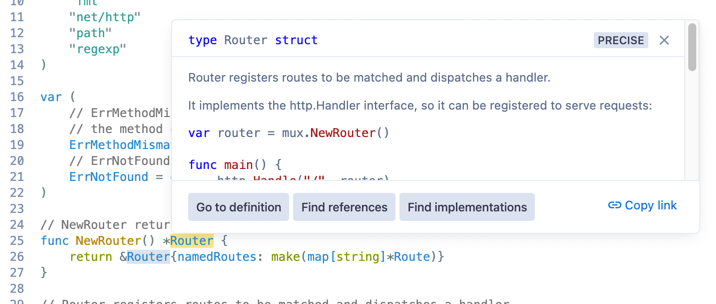
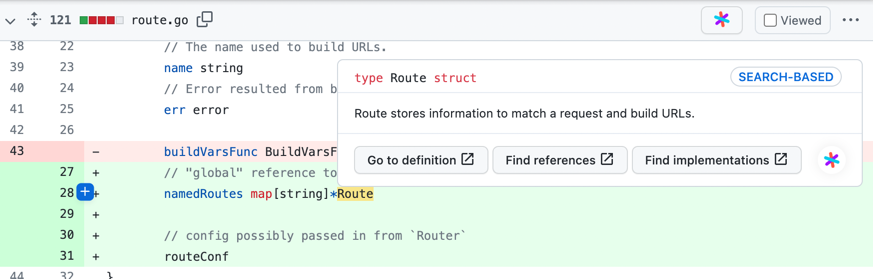
- Hover tooltips
- Go-to-definition
- Find references
- Symbol search
Sourcegraph gives you code navigation in:
- code files in Sourcegraph's web UI
- diffs in your code review tool, via integrations
- code files on your code host, via integrations
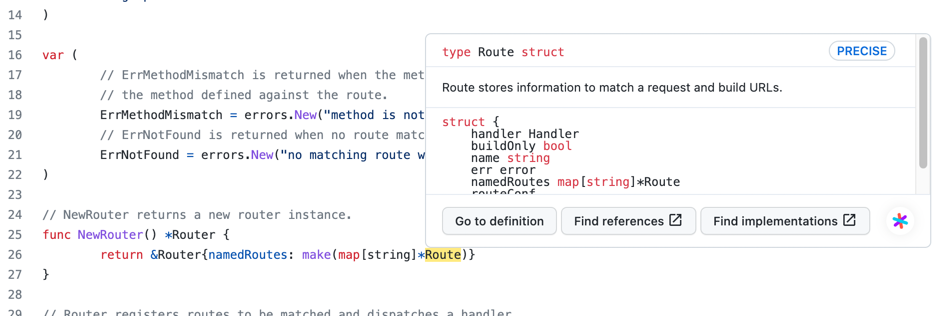
Please read the code navigation documentation to learn more and to set it up.
Deep Search
Deep Search is an agentic code search tool that understands natural language questions about your codebase. Unlike traditional search, Deep Search uses AI to intelligently explore your code, following leads and synthesizing information to provide comprehensive, conversational answers.
Key capabilities
- Ask questions in natural language and get detailed, sourced answers about architecture, implementations, and code patterns
- Use @-mentions to scope searches to specific repositories, files, directories, or symbols for faster, more focused results
- Follow up with additional questions to dive deeper into specific aspects of your codebase
- View all sources - see exactly which searches were performed and which files were analyzed for full transparency
Deep Search works across your entire codebase, no matter how large, and is available on Enterprise Starter and Enterprise plans.
Batch Changes
Automate changes to your codebase. Reduce effort, reduce errors, and enable developers to focus on high-value work.
Read the batch changes documentation to learn more, including helpful how-to guides. Want a video tutorial? Check out this batch change tutorial
Code Insights
Sourcegraph lets you understand and analyze code trends by visualizing how the codebase changes. Measure and act on engineering goals such as migration and component deprecation.
Read the code insights documentation to learn more, including helpful how-to guides.
Integrations
Sourcegraph allows you to get code navigation and code search on code files and code review diffs in your code host and review tool or from your IDE, and also provides an MCP server for additional integrations.
MCP Server
Sourcegraph provides a Model Context Protocol (MCP) Server that connects AI tools and IDEs directly to your code intelligence platform. The MCP Server enables you to integrate Sourcegraph's search, navigation, and analysis capabilities into your favorite development tools.
Learn more about the MCP Server
IDE integration
Sourcegraph's editor integrations allow you to search and navigate across all of your repositories without ever leaving your IDE or checking them out locally. Learn more about how to set them up here.
Browser extension
Our browser extension directly adds code navigation within your code hosts (GitHub, GitLab, Bitbucket, and Phabricator) via Chrome, Safari, and Firefox browsers. Learn more about how to set up the browser extension here.