Every engineer has been burned by documentation that lied. The setup guide references a flag removed two releases ago, the architecture diagram shows a service deleted last year, and the API doc describes a parameter that no longer exists. The problem is almost never that someone wrote bad docs. It's that the docs lived somewhere the code changes couldn't reach them, so they rotted while the code moved on. Documentation as code is the discipline that fixes the location problem, and most of its benefits follow from that one move.
This guide covers what docs as code actually means, the workflow, the honest trade-offs (including the recent backlash, covered below), the tooling, and the part that teams underestimate: keeping docs true to the code they describe.
What is documentation as code?
Documentation as code, or docs as code, is the practice of writing and maintaining documentation using the same tools and workflows you use for software. As the Write the Docs community defines it, that means version control with Git, plain-text markup like Markdown or AsciiDoc, code reviews, and automated tests, applied to docs instead of code. Documentation lives in the repository next to the code it describes, goes through pull requests, and ships through the same pipeline.
The shift is less about any single tool and more about a change in where docs live and who maintains them. When documentation is a Word file on a shared drive or a wiki page in a separate system, it's nobody's job, and everybody's blind spot. When it's a Markdown file in the repo that fails CI if a link breaks, it becomes part of the definition of done. That's the whole idea: treat docs like code so they get the same care code gets.
Docs as code vs. "code as documentation"
These two phrases sound interchangeable and mean almost opposite things, so it's worth separating them early. Docs as code is about applying engineering workflows to prose documentation. The older idea, which Martin Fowler wrote about in Code as Documentation, is the argument that the source code itself is a major, even primary, form of documentation, so you should write code clearly enough that it explains itself.
Both are true, and they're complementary. Clear, self-documenting code reduces the amount of prose you need; docs as code make the prose you do need reliable. Where teams get into trouble is treating one as a substitute for the other. Self-documenting code doesn't capture why a decision was made or how three services fit together, and prose docs don't replace readable code. You want both, and the rest of this guide is about the prose half.
How the docs-as-code workflow works
The workflow mirrors the development workflow, beat for beat.
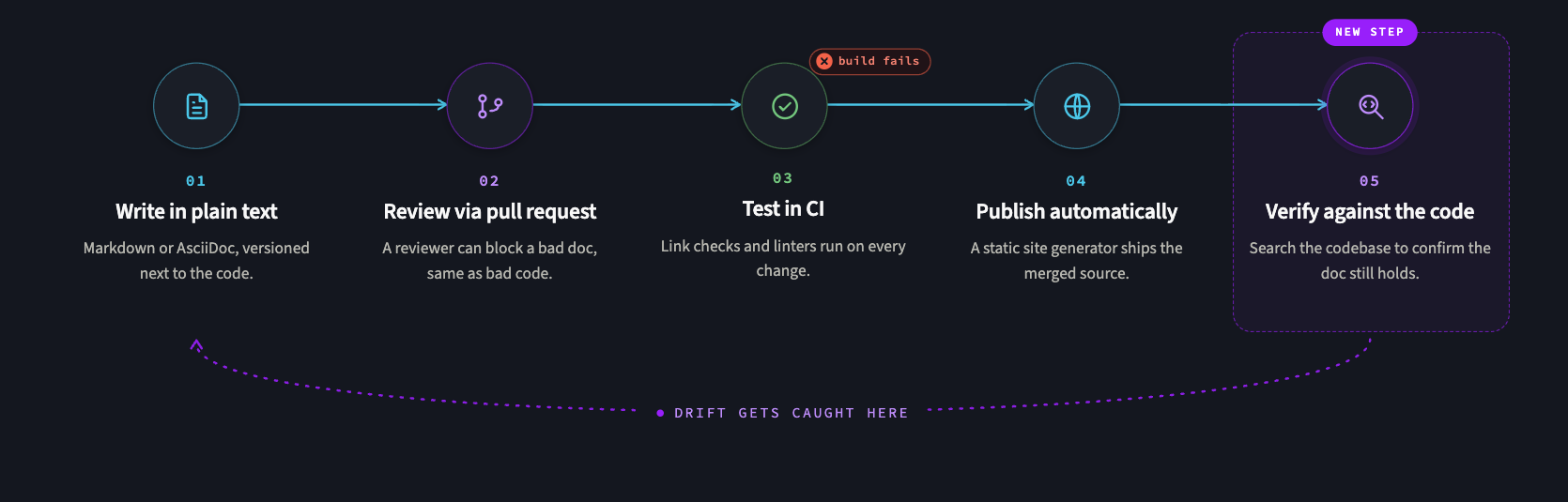
The docs-as-code pipeline runs docs through the same stages as code: write, review, test, publish.
- Write in plain text. Authors write in Markdown, reStructuredText, or AsciiDoc, in files that live in the repo. Plain text diffs cleanly, which is what makes everything downstream possible.
- Review via pull request. Docs changes go through the same pull-request review as code. A reviewer can see exactly what changed, comment inline, and block a merge if the doc is wrong, the same gate that catches bad code.
- Test in CI. Automated checks run on every docs change: link checkers catch dead URLs, linters enforce style, and builds fail if the docs don't compile. This is the step that turns "we should update the docs" into "the build won't go green until we do."
- Publish automatically. A static site generator renders the plain text into a docs site on merge, so published docs are always a build of the latest reviewed source. No manual copy-paste, no separate publish step to forget.
A useful companion to the workflow is a content structure like the Diátaxis framework, which organizes docs into tutorials, how-to guides, reference, and explanation. Docs as code handles how docs are produced; a framework like Diátaxis handles what to write, and the two pair naturally.
Benefits (and honest trade-offs)
The benefits follow from the workflow. Docs version with the code, so the docs for v2.3 are the docs that shipped with v2.3. They go through a review, so they're more accurate. They build in CI, so broken references get caught. And because they live in the repo, the person changing the code is right there to change the doc, which is the single biggest driver of docs staying current.
But docs as code has a real, current criticism worth taking seriously, because the engineering community is actively re-litigating it. The objection: a plain-text, Git-based, PR-reviewed pipeline raises the barrier to entry for non-technical contributors. A product manager or support lead who'd happily fix a wiki page may balk at cloning a repo, writing Markdown, and opening a pull request. Optimizing the doc process for the people who write code can mean fewer docs from the people who don't.
The honest answer is that this is a genuine trade-off, not a solved problem. The mitigation most teams reach for is a web-based editing layer on top of the Git workflow, so non-technical contributors can edit in a browser while the content remains under version control. The principle to keep is "optimize the doc process for the people writing the docs," and the right answer depends on who those people actually are. Docs as code is a strong default for developer-facing documentation written by developers; it's a worse default for marketing or end-user content written by non-engineers.
The toolchain assembles from a few categories, and most teams mix and match:
- Markup: Markdown, AsciiDoc, or reStructuredText, the plain-text formats docs are written in.
- Static site generators: tools like Docusaurus, MkDocs, or Hugo that render markup into a docs site.
- Linters and checkers: style linters (Vale and similar) and link checkers that run in CI.
- Diagrams as code: Mermaid and similar, so diagrams live in version control as text instead of binary files that go stale.
- Docs platforms: managed tools that layer a web editor and hosting over the Git workflow.
The category that matters most is the one your team will actually maintain. A simpler stack the team keeps current beats an elaborate one that rots, which is the same lesson the docs themselves teach.
Keeping docs true to the code
Here's the hard part that docs-as-code makes better but doesn't fully solve: drift. Putting docs in the repo makes them easy to update, but it doesn't force anyone to update them when the underlying code changes. The API doc and the API can still diverge; just now, they diverge in the same repository.
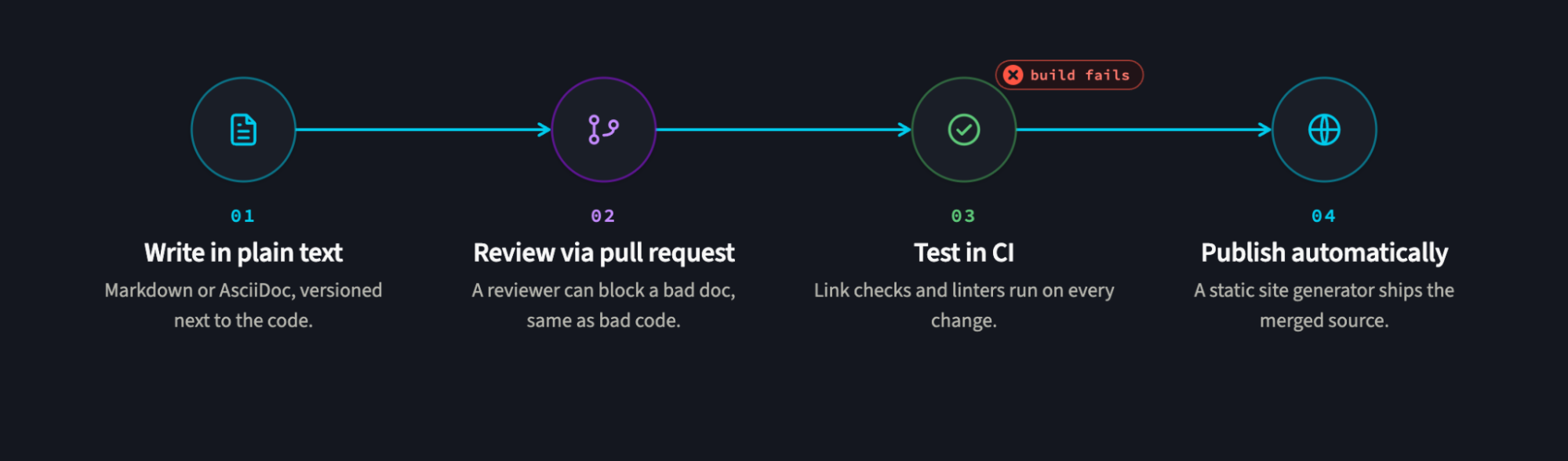
Add a verification step that checks doc claims against the code, and drift gets caught before it ships.
This is where treating docs and code as one searchable corpus pays off. Because Code Search indexes Markdown and docs files alongside source code across every repository, you can find every doc that mentions a function or endpoint you're about to rename, the same way you'd find every caller. A migration that changes an API becomes a search for the API's name across both code and docs, so the docs get caught in the same net as the code. (Disclosure: Sourcegraph is our product.)
For the migration itself, Batch Changes can update doc references across many repositories with a single declarative change, so renaming a service updates its mentions in the docs of every repo that references it, not just the code. And for staleness as an ongoing metric, Code Insights can trend a query like "docs still referencing the deprecated endpoint" toward zero.
The throughline: docs drift least when they live with the code, are searchable with the code, and change with the code. Our guide to InnerSource covers the cultural side of building that shared-ownership habit.
Docs as code in the AI era
There's a new reason docs' accuracy suddenly matters more: AI. Coding assistants and agents increasingly read your documentation as context, so a stale doc no longer just misleads a human; it misleads the model, which then generates code based on a description of how the system worked two releases ago. Documentation has quietly become part of your codebase's input, not just a description of its output.
That raises the stakes on the drift problem in a specific way. The emerging failure mode is docs that look fresh but encode an assistant's inferences rather than verified reality, because an agent will confidently "update" a doc to match what it thinks the code does. The defense is the same discipline that docs-as-code already encourages, plus one addition: verify doc claims against the actual code. A reference to a function, table, or endpoint should be checkable, ideally by searching the codebase to confirm the thing the doc describes still exists. In an AI-assisted workflow, that verification step is what separates documentation from confident fiction.
How to get started with docs as code
You don't need to convert everything at once. A pragmatic adoption path:
- Move one doc set into the repo. Pick the developer-facing docs that rot fastest and put them in Markdown next to the code.
- Add a CI check. Start with a link checker. It's low-effort and immediately catches the most common kind of stale doc.
- Route docs through pull requests. Make doc changes reviewable the same way code is, so accuracy gets a gate.
- Add a static site generator. Render the Markdown to a published site on merge, so there's no manual publish step.
- Make "update the docs" part of done. The cultural step that makes the rest stick: a change isn't complete until its docs are.
Start narrow, prove the workflow on one doc set, and expand from there. The teams that succeed treat docs as code as a habit they grow into, not a platform they install.
Put the docs where the code is
Documentation as code is a small idea with a large payoff: keep docs in the repo, run them through the same review and CI as code, and a large part of the staleness problem becomes easier to manage because the docs can no longer drift out of sight. The best implementations keep Git as the source of truth while giving non-engineers a friendlier editing surface on top.
The remaining drift, docs and code diverging inside the same repo, is a search-and-verification problem, and it's getting more important as AI tools start treating your docs as ground truth. If your docs and code already live together but still drift apart, make them into a single searchable corpus. See how Code Search lets you find every doc that references the code you're about to change, so the docs get updated in the same pass.
FAQ
What is documentation as code? The practice of writing docs with the same tools and workflows as software: version control, plain-text markup, pull-request review, and automated testing, with the docs living in the repository next to the code they describe.
What are the 4 types of documentation? A widely used model (the Diátaxis framework) splits documentation into tutorials, how-to guides, reference, and explanation, each serving a different reader need. Docs as code is about the workflow; this is about the content structure, and they complement each other.
What is the difference between docs as code and code as documentation? Docs as code applies engineering workflows to prose documentation. Code as documentation is the older idea that source code is itself a primary form of documentation, so you should write it to be self-explanatory. They're complementary, not competing.
Is docs as code worth it? For developer-facing documentation maintained by developers, almost always the case because it keeps the docs accurate and close to the code. For content authored mainly by non-technical contributors, weigh the higher barrier to entry and consider adding a web-editing layer on top of the Git workflow.