

Slack Integration
Supported on Enterprise plans.
The Sourcegraph Slack integration brings the power of Deep Search directly into your Slack workspace. When you mention @Sourcegraph in any Slack channel or thread, a Deep Search conversation starts right there—no context switching required.
Features
- In-thread Deep Search: Mention
@Sourcegraphin any thread to ask questions. Deep Search uses the thread's messages as context to help answer. - Follow-up questions: Continue the conversation by mentioning
@Sourcegraphagain in the same thread. - Direct messages: Message the Sourcegraph bot directly to have private conversations about your code.
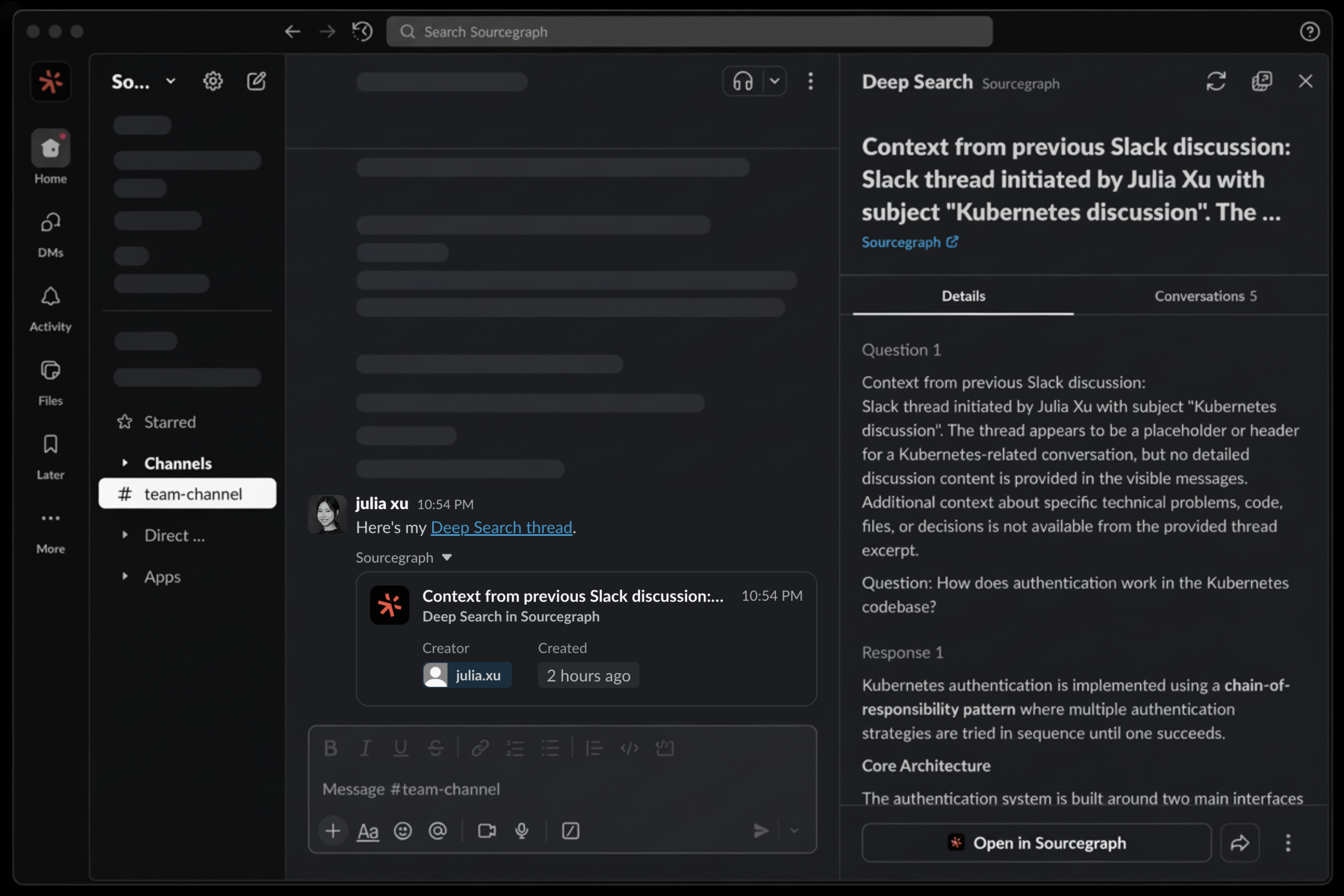
- Rich link previews: Deep Search links shared in Slack automatically unfurl with context:
Getting started
To set up the Sourcegraph Slack integration:
- Navigate to Administration → Integrations → Slack Integration in your Sourcegraph instance
- Click Connect to Slack and follow the setup wizard.
- Once connected, users can mention
@Sourcegraphin any channel where the app is added.
Note: Sourcegraph will automatically map Slack users to a Sourcegraph user account (using their email in Slack and their verified email on Sourcegraph) to associate a question asked in Slack with a Sourcegraph user, for features like Deep Search question history view, etc.
Using the integration
Starting a conversation
In any Slack channel or direct message where the Sourcegraph app is present, mention @Sourcegraph followed by your question. You can specify a repository to search in as part of your message and Deep Search will find it:
SHELL@Sourcegraph How does the router handle middleware in the gorilla/mux repository?
Sourcegraph will respond in a thread with a detailed answer powered by Deep Search, and you may ask @Sourcegraph follow-up questions about the same topic.
Using thread context
Deep Search automatically uses the messages in the current Slack thread as context. This means you can have a lengthy discussion with colleagues in a thread, and then ask:
SHELL@Sourcegraph Can you answer this?
Deep Search will understand what "this" refers to based on the preceding conversation, researching relevant code, etc. as needed to find relevant answers.
Asking follow-up questions
Continue the conversation by replying in the thread and mentioning @Sourcegraph again:
SHELL@Sourcegraph Can you show me where the JWT tokens are validated?
Direct messages
You can also message the Sourcegraph bot directly for private conversations about your codebase. Find the Sourcegraph app in your Slack workspace and start a direct message.
Asking new questions in the same thread
Once a Deep Search has been started in a Slack thread, you can ask a brand new question in the same Slack thread by prefixing your message with new question or different question, like @Sourcegraph different question, what is a JWT token? Does gorilla/mux handle that?
Troubleshooting
The app doesn't respond to mentions
- Ensure the Sourcegraph app has been added to the channel
- Verify the integration is properly connected in Administration → Integrations → Slack Integration—errors will appear on this page if the integration is not configured correctly
- Check that Deep Search is enabled for your Sourcegraph instance
Checking integration status
The Administration → Integrations → Slack Integration page displays any configuration errors and automatically detects issues with your setup. It will verify that Slack can connect to your Sourcegraph instance, and checks that all required scopes and permissions are correctly configured in your Slack app. If no warnings appear on the page, everything is working correctly.
Permissions reference
The section below explains the permissions used by the Sourcegraph Slack app for your reference.
All required permissions below are automatically provided via the app manifest generated during the setup process, so no manual configuration is needed. The Administration → Integrations → Slack Integration page will automatically verify that your app's permissions match what Sourcegraph expects.
OAuth scopes
| Permission | Purpose |
|---|---|
app_mentions:read | Allows the app to detect when users mention @Sourcegraph to begin a Deep Search. |
assistant:write | Enables the Slack Assistant feature, allowing Sourcegraph to respond in the Assistant panel for direct, contextual interactions. |
channels:history | Enables the app to read message history in the Slack thread where @Sourcegraph was tagged, in order to provide context for the Deep Search conversation |
chat:write | Allows the app to send Deep Search responses back to Slack channels and threads where it was mentioned. |
files:read | Allows the app to read files shared in Slack messages to include them as context for Deep Search conversations. |
groups:history | Enables the app to read message history in private channels it is added to (only read when mentioned.) |
im:history | Enables the app to read direct message history (with the app only), for one-on-one conversations with Sourcegraph. |
im:write | Allows the app to send direct messages to users, enabling the bot to reply in DM conversations. |
links:read | Enables the app to read link metadata when unfurling Deep Search URLs for rich link previews. |
links:write | Enables the app to post rich previews when Deep Search links are shared in Slack |
mpim:history | Enables the app to read message history in direct messaging groups it is added to |
reactions:write | Allows the app to add emoji reactions to messages, such as indicating when a Deep Search is in progress. |
team:read | Allows the app to access basic information about the Slack workspace, for configuration and producing links to your Slack workspace in site admin areas. |
users:read | Enables the app to read basic user profile information to associate Slack users with Sourcegraph accounts |
users:read.email | Allows the app to read user email addresses to match Slack users with their Sourcegraph accounts |