

Deep Search API
The experimental Deep Search API has been deprecated as of
Sourcegraph 7.0. In
this release, a new versioned Sourcegraph API is being introduced for
custom integrations,
available at /api-reference (e.g.
https://sourcegraph.example.com/api-reference). This experimental Deep
Search API remains available, but we recommend migrating to the new API
for a stable integration experience. If you need migration assistance,
please reach out at support@sourcegraph.com.
Learn more about the Sourcegraph API here.
If you're using the experimental Deep Search API, see the migration
guide to upgrade to the new /api/
endpoints.
Migrating to the New Sourcegraph API
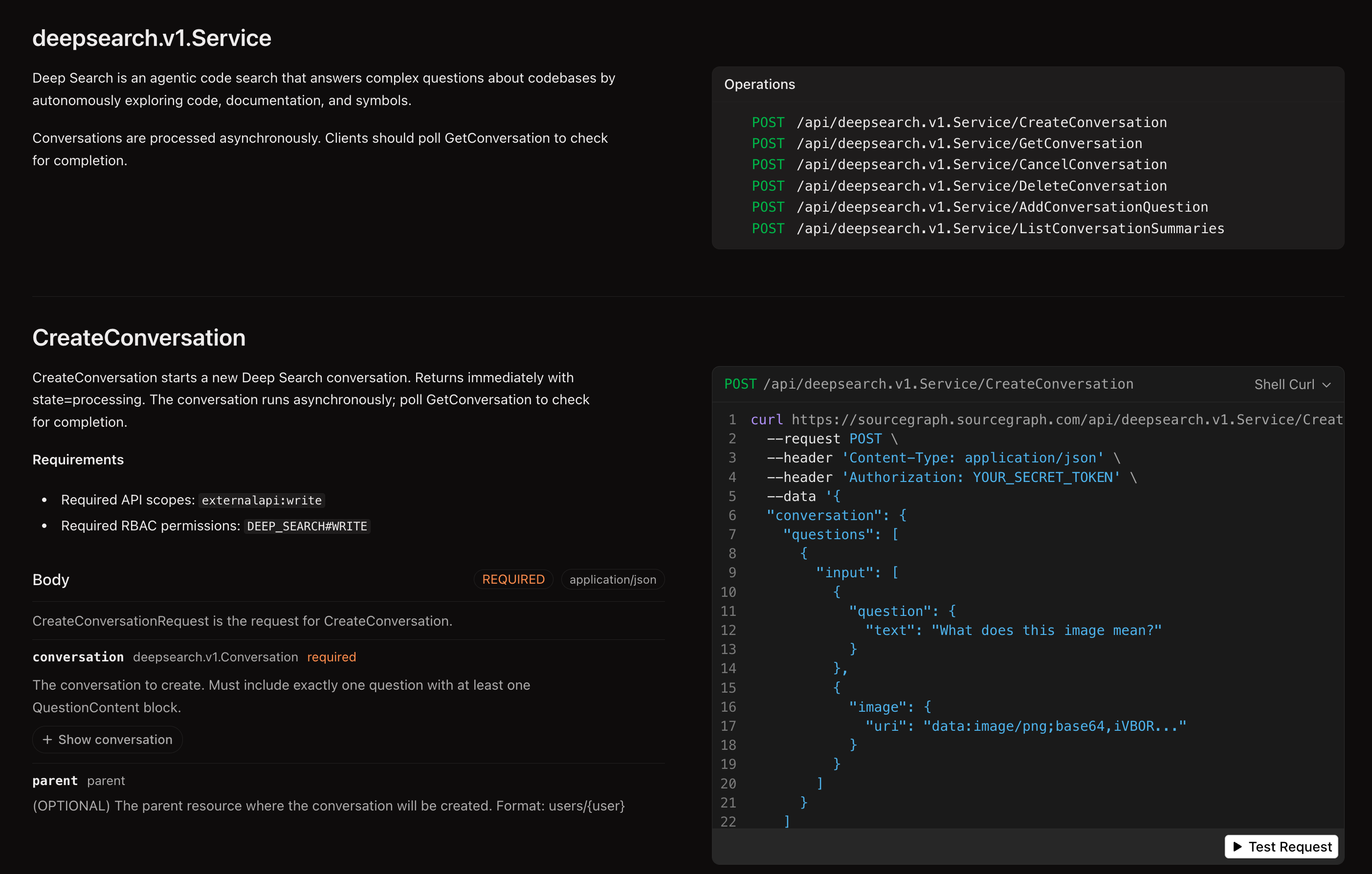
Starting in Sourcegraph 7.0, Sourcegraph introduces a new, versioned API at /api/. The new API provides stable, supported endpoints for functionality previously served by this experimental Deep Search API. See the Sourcegraph API changelog for more details.
An interactive API reference is available at /api-reference on your Sourcegraph instance (e.g. https://sourcegraph.example.com/api-reference), where you can view all operations and download the OpenAPI schema.
What changed
- Base URL:
/.api/deepsearch/v1/...→/api/deepsearch.v1.Service/... - Token scopes: Any access token → token with
externalapi:read/externalapi:writescope X-Requested-Withheader: No longer required- Resource identifiers: Numeric IDs (
140) → resource names (users/~self/conversations/140). For requests that require a parent, useusers/~selffor the authenticated user. - Request format: Flat JSON (
{"question": "..."}) → nested structure (conversation.questions[].input[].question.text) - Status field: Plain string (
status: "processing") →oneofobject (state: { "processing": {} })- Errors are now a distinct state rather than a
completedstatus with anerrorfield:JSON"state": { "error": { "code": "ERROR_INTERNAL | ERROR_QUOTA_EXCEEDED | ERROR_ENTITLEMENT_EXCEEDED | ERROR_TOKEN_LIMIT_EXCEEDED", "message": "...", "retry_time": "..." } }
- Errors are now a distinct state rather than a
Endpoint mapping
| Operation | Old endpoint | New endpoint |
|---|---|---|
| Create conversation | POST /.api/deepsearch/v1 | POST /api/deepsearch.v1.Service/CreateConversation |
| Get conversation | GET /.api/deepsearch/v1/{id} | POST /api/deepsearch.v1.Service/GetConversation |
| List conversations | GET /.api/deepsearch/v1 | POST /api/deepsearch.v1.Service/ListConversationSummaries |
| Add follow-up | POST /.api/deepsearch/v1/{id}/questions | POST /api/deepsearch.v1.Service/AddConversationQuestion |
| Cancel question | POST /.api/deepsearch/v1/{id}/questions/{qid}/cancel | POST /api/deepsearch.v1.Service/CancelConversation |
| Delete conversation | DELETE /.api/deepsearch/v1/{id} | POST /api/deepsearch.v1.Service/DeleteConversation |
Response field mapping
| Old field | New field |
|---|---|
id: 140 | name: "users/~self/conversations/140" |
status: "processing" | state: { "processing": {} } |
status: "completed" + error | state: { "error": { "code": "...", "message": "..." } } |
questions[].answer | questions[].answer (unchanged) |
Notes on the new request format
The new API uses a nested request structure. For example, CreateConversation requires conversation.questions[].input[].question.text rather than a flat {"question": "..."}. See the interactive API reference at /api-reference on your instance for request examples and exact schemas.
Conversations are still processed asynchronously — poll GetConversation until the state field reaches a terminal value (completed, error, or canceled). For error states, inspect code for the error type (ERROR_QUOTA_EXCEEDED, ERROR_TOKEN_LIMIT_EXCEEDED, etc.) and message for details.
AI-assisted migration
The fastest way to migrate is to give your AI coding agent the OpenAPI schema and this migration guide, and let it update your code. You can download the schema from /api-reference on your Sourcegraph instance (e.g. https://sourcegraph.example.com/api-reference) — look for the Download button. Then use a prompt like the following:
TEXTMigrate the Deep Search API calls in this project from the deprecated
/.api/deepsearch/v1 endpoints to the new Sourcegraph /api/deepsearch.v1.Service/
endpoints. The main file to update is <path-to-your-file>.

Use the migration guide on
https://sourcegraph.com/docs/deep-search/api#migrating-to-the-new-sourcegraph-api
for reference. Use the attached OpenAPI schema (@sourcegraph-openapi.yml) as the
specification for the new API.
Replace <path-to-your-file> with the file(s) in your project that call the Deep Search API, and attach the downloaded OpenAPI schema so the agent can reference the exact request/response shapes.
For a real-world example, see this Amp thread migrating the raycast-sourcegraph extension from the old API to the new endpoints.
If you have questions about the migration or need features not yet available in the new API, reach out at support@sourcegraph.com.
Legacy API reference
The Deep Search API provides programmatic access to Sourcegraph's agentic code search capabilities. Use this API to integrate Deep Search into your development workflows, build custom tools, or automate code analysis tasks.
Authentication
All API requests require authentication using a Sourcegraph access token. You can generate an access token from your user settings.
BASH# Set your access token
export SRC_ACCESS_TOKEN="your-token-here"
Base URL
All Deep Search API endpoints are prefixed with /.api/deepsearch/v1 and require the X-Requested-With header to identify the client:
BASHcurl 'https://your-sourcegraph-instance.com/.api/deepsearch/v1' \
  -H 'Accept: application/json' \
  -H 'Content-Type: application/json' \
  -H "Authorization: token $SRC_ACCESS_TOKEN" \
  -H 'X-Requested-With: my-client 1.0.0'
The X-Requested-With header is required and should include your client
name and version number.
Creating conversations
All Deep Search conversations are processed asynchronously. When you create a conversation, the API will return immediately with a conversation object containing the question in processing status.
Create a new Deep Search conversation by asking a question:
BASHcurl 'https://your-sourcegraph-instance.com/.api/deepsearch/v1' \
  -H 'Accept: application/json' \
  -H 'Content-Type: application/json' \
  -H "Authorization: token $SRC_ACCESS_TOKEN" \
  -H 'X-Requested-With: my-client 1.0.0' \
  -d '{"question":"Does github.com/sourcegraph/sourcegraph have a README?"}'
The API returns a conversation object with the question initially in processing status:
JSON{
	"id": 140,
	"questions": [
		{
			"id": 163,
			"conversation_id": 140,
			"question": "Does github.com/sourcegraph/sourcegraph have a README?",
			"created_at": "2025-09-24T08:14:06Z",
			"updated_at": "2025-09-24T08:14:06Z",
			"status": "processing",
			"turns": [
				{
					"reasoning": "Does github.com/sourcegraph/sourcegraph have a README?",
					"timestamp": 1758701646,
					"role": "user"
				}
			],
			"stats": {
				"time_millis": 0,
				"tool_calls": 0,
				"total_input_tokens": 0,
				"cached_tokens": 0,
				"cache_creation_input_tokens": 0,
				"prompt_tokens": 0,
				"completion_tokens": 0,
				"total_tokens": 0,
				"credits": 0
			},
			"suggested_followups": null
		}
	],
	"created_at": "2025-09-24T08:14:06Z",
	"updated_at": "2025-09-24T08:14:06Z",
	"user_id": 1,
	"read_token": "caebeb05-7755-4f89-834f-e3ee4a6acb25",
	"share_url": "https://your-sourcegraph-instance.com/deepsearch/caebeb05-7755-4f89-834f-e3ee4a6acb25"
}
To get the completed answer, poll the conversation endpoint:
BASHcurl 'https://your-sourcegraph-instance.com/.api/deepsearch/v1/140' \
  -H 'Accept: application/json' \
  -H "Authorization: token $SRC_ACCESS_TOKEN" \
  -H 'X-Requested-With: my-client 1.0.0'
Once processing is complete, the response will include the answer:
JSON{
	"id": 140,
	"questions": [
		{
			"id": 163,
			"conversation_id": 140,
			"question": "Does github.com/sourcegraph/sourcegraph have a README?",
			"created_at": "2025-09-24T08:14:06Z",
			"updated_at": "2025-09-24T08:14:15Z",
			"status": "completed",
			"title": "GitHub README check",
			"answer": "Yes, [github.com/sourcegraph/sourcegraph](https://sourcegraph.test:3443/github.com/sourcegraph/sourcegraph) has a [README.md](https://sourcegraph.test:3443/github.com/sourcegraph/sourcegraph/-/blob/README.md) file in the root directory.",
			"sources": [
				{
					"type": "Repository",
					"link": "/github.com/sourcegraph/sourcegraph",
					"label": "github.com/sourcegraph/sourcegraph"
				}
			],
			"stats": {
				"time_millis": 6369,
				"tool_calls": 1,
				"total_input_tokens": 13632,
				"cached_tokens": 12359,
				"cache_creation_input_tokens": 13625,
				"prompt_tokens": 11,
				"completion_tokens": 156,
				"total_tokens": 13694,
				"credits": 2
			},
			"suggested_followups": [
				"What information does the README.md file contain?",
				"Are there other important documentation files in the repository?"
			]
		}
	],
	"created_at": "2025-09-24T08:14:06Z",
	"updated_at": "2025-09-24T08:14:15Z",
	"user_id": 1,
	"read_token": "caebeb05-7755-4f89-834f-e3ee4a6acb25",
	"viewer": {"is_owner": true},
	"quota_usage": {
		"total_quota": 0,
		"quota_limit": -1,
		"reset_time": "2025-10-01T00:00:00Z"
	},
	"share_url": "https://sourcegraph.test:3443/deepsearch/caebeb05-7755-4f89-834f-e3ee4a6acb25"
}
Adding follow-up questions
Continue a conversation by adding follow-up questions. The conversation_id in the request body must match the conversation ID in the URL:
BASHcurl 'https://your-sourcegraph-instance.com/.api/deepsearch/v1/140/questions' \
  -H 'Accept: application/json' \
  -H 'Content-Type: application/json' \
  -H "Authorization: token $SRC_ACCESS_TOKEN" \
  -H 'X-Requested-With: my-client 1.0.0' \
  -d '{"conversation_id":140,"question":"What does the README file contain?"}'
Listing conversations
Get all your conversations with optional filtering:
BASH# List all conversations
curl 'https://your-sourcegraph-instance.com/.api/deepsearch/v1' \
  -H 'Accept: application/json' \
  -H "Authorization: token $SRC_ACCESS_TOKEN" \
  -H 'X-Requested-With: my-client 1.0.0'

# List with pagination and filtering
curl 'https://your-sourcegraph-instance.com/.api/deepsearch/v1?page_first=10&sort=created_at' \
  -H 'Accept: application/json' \
  -H "Authorization: token $SRC_ACCESS_TOKEN" \
  -H 'X-Requested-With: my-client 1.0.0'
Available query parameters:
filter_id- Filter by conversation IDfilter_user_id- Filter by user IDfilter_read_token- Access conversations via read token (requires sharing to be enabled)filter_is_starred- Filter by starred conversations (trueorfalse)page_first- Number of results per pagepage_after- Pagination cursorsort- Sort order:id,-id,created_at,-created_at,updated_at,-updated_at(default:-updated_at)
Managing conversations
Get a specific conversation:
BASHcurl 'https://your-sourcegraph-instance.com/.api/deepsearch/v1/140' \
  -H 'Accept: application/json' \
  -H "Authorization: token $SRC_ACCESS_TOKEN" \
  -H 'X-Requested-With: my-client 1.0.0'
Delete a conversation:
BASHcurl 'https://your-sourcegraph-instance.com/.api/deepsearch/v1/140' \
  -X DELETE \
  -H "Authorization: token $SRC_ACCESS_TOKEN" \
  -H 'X-Requested-With: my-client 1.0.0'
Cancel a processing question:
BASHcurl 'https://your-sourcegraph-instance.com/.api/deepsearch/v1/140/questions/163/cancel' \
  -X POST \
  -H 'Accept: application/json' \
  -H "Authorization: token $SRC_ACCESS_TOKEN" \
  -H 'X-Requested-With: my-client 1.0.0'
Accessing conversations via read tokens
You can retrieve a conversation using its read token with the filter_read_token query parameter.
Each conversation includes a read_token field that allows accessing the conversation.
The read token is also visible in the web client URL and in the share_url field.
Note that you can only access other users' conversations via read tokens if sharing is enabled on your Sourcegraph instance.
BASHcurl 'https://your-sourcegraph-instance.com/.api/deepsearch/v1?filter_read_token=5d9aa113-c511-4687-8b71-dbc2dd733c03' \
  -H 'Accept: application/json' \
  -H "Authorization: token $SRC_ACCESS_TOKEN" \
  -H 'X-Requested-With: my-client 1.0.0'
Response structure
Conversation object:
id- Unique conversation identifierquestions- Array of questions and answerscreated_at/updated_at- Timestampsuser_id- Owner user IDread_token- Token for sharing accessshare_url- URL for sharing the conversation
Question object:
id- Unique question identifierquestion- The original question textstatus- Processing status:pending,processing,completederror- Error details if the question processing encountered an issuetitle- Generated title for the questionanswer- The AI-generated answer (when completed)sources- Array of sources used to generate the answersuggested_followups- Suggested follow-up questions
If a question fails to process, the status will be completed and the error field will be populated, for example:
JSON{
	"status": "completed",
	"error": {
		"title": "Token limit reached",
		"kind": "TokenLimitExceeded",
		"message": "The search exceeded the maximum token limit...",
		"details": "Additional context about the error"
	}
}
Error handling
The API returns standard HTTP status codes with descriptive error messages:
200- Success202- Accepted (for async requests)400- Bad Request401- Unauthorized404- Not Found500- Internal Server Error