Security Automation Evolved: From SlackOps to Programmatic SIEM Triage (Part 1/2)
How Sourcegraph's security team evolved from a Slack-based triage bot to programmatic SIEM detection with expression-based auto-close rules.

How Sourcegraph's security team evolved from a Slack-based triage bot to programmatic SIEM detection with expression-based auto-close rules.
In 2022 we created a Slackbot named 'SecBot' to get around certain limitations from Elastic Security, our Security Information and Event Management (SIEM) platform. Certain alerts always had the same investigation pattern so SecBot called Elastic or GCP APIs to uncover information in a reply to the actual alert. We gradually added more and more of these enrichments.
An important milestone, since we use Entitle for JIT permissions, was the ability to see the information permissions and the justifications a user had added to the time of triggering an alert. This meant that we could often triage and close alerts just from our phones!
The first iteration of SecBot used simple pattern matching to match rules from Elastalert to a certain enrichment. We added default enrichments, for example the Entitle permissions that user had and the time it was granted:

Early days, resolving project name and permissions
SecBot exposes commands for the engineers to help triage alerts. By typing commands such as @SecBot locate user [email] it goes through Okta and Google Workspace logs to find recent IP addresses and locations for the user.
SecBot can also query threat intelligence sources, provide context from WHOIS databases and query GCP and Cloudflare to manually enrich alerts when necessary. If we had to manually investigate certain alerts a few times a month, we'd add a command or an enrichment. But this was still rather manual work.
We didn't really start leveraging our Elastic SIEM until later in 2024. Before then we were heavily using Elastalert for security detections. With Elastalert we used pattern matching and regex to extract fields from alerts and provide them to enrichment. This was quite a hack, but it worked.
After migrating all of our rules to the SIEM we realized the bot could directly template and send out alerts. That way we'd have access to all the required fields to perform actions. Since triaging alerts is based on SlackOps, we can close alerts using Slack emoji's. This also makes it clear to however is observing the messages, that the alert has been triaged.
This also makes it easy to add enrichments from other services, such as GCP. Our Cloud assets have randomized names, which is great but make it near impossible to deduce whether a service-account is deviating from its regular patterns of behaviour. In our case the asset descriptions in GCP contain the information we need. We can technically attempt to sync the state of GCP into our ES cluster, but this is very time consuming and doesn't always guarantee the information to be accurate or available at the time of an alert. We decide to make enrichments that fetch the information at the time of the alert. It resolves project names and service-accounts to their more useful displayname or descriptions.
The below image showed how this information would be presented 2 years ago.

More mature SecBot, enriching SIEM alerts and closing alerts.

A simplified diagram of SecBot's enrichment and alerting pipeline
After implementing the enrichments, it became clear that some alerts could be closed entirely based on the metadata provided by GCP. What if we could programmatically close alerts? We couldn't write exceptions in ES as the information wasn't present in any of the indices. Instead we decided to implement expr-lang, a Go expression evaluation library, which allows us to write expressions within our bot's rule definitions.
For example, in our indices we enrich logs with information from our HR system if an actor is an employee, which includes the division of the company they are in. Another enrichment we added was the ability to see whether an employee was on-call. Combined with the GCP metadata, we can create an expression that can automatically close alerts that meet the following criteria:
In expr-lang this expression looks like:
getProjectDetails(IncludedFields["cloud.project.id"]).Labels["instance-type"] == "internal"
  || (
       isUserOnCall(IncludedFields["user.email"])
       && IncludedFields["enriched_employee.division"] == "Platform"
     )
The highlighted text are function calls that we added to the runtime of the expression engine. With this in place we can now automatically close alerts that match these criteria. SecBot automatically includes all the alert fields into the expression evaluators' environment. Many of these fields are also added to Redis so certain SecBot commands do not require a user to type the IP or an email address to investigate an actor. It also allows automatic enrichments to query Elastic with fields from the alert.
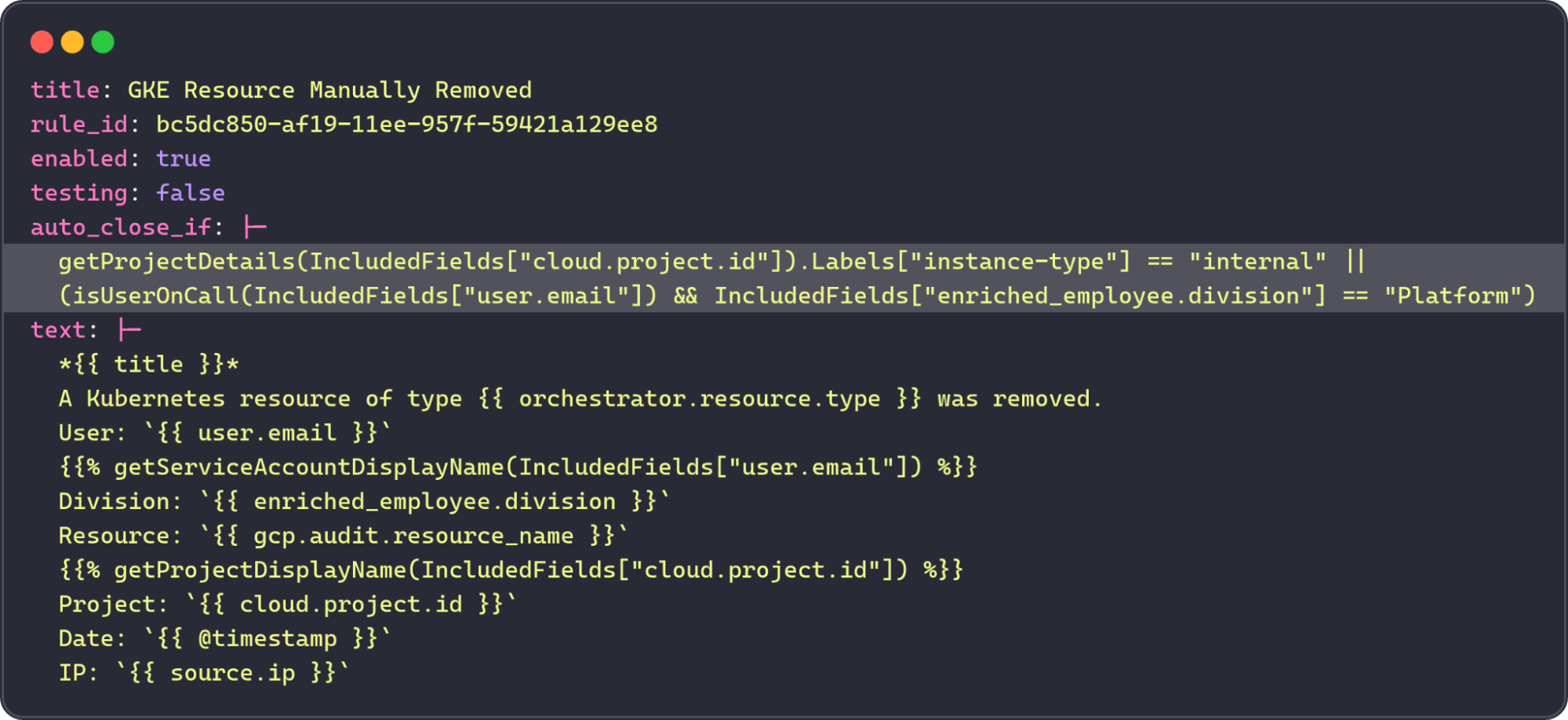
Example rule containing an auto-close statement
An expression like this closes the alert in the SIEM but we do like to observe these events come in still. So they show up in our Slack channel with a ✅ reaction from our beloved bot.

Stay tuned for part 2 where we discuss how our detection stack evolves and now includes a semi-autonomous agent.
A special thanks to Justin Dorfman, Dora Neumeier, and André Eleuterio for their contributions to this blog post.

With Sourcegraph, the code understanding platform for enterprise.
Schedule a demo