An alternate title for this post could have been 'existing benchmarks are awful at evaluating how well agents can perform development tasks, not to mention universally misinterpreted, and I mostly can't use them to evaluate software development capabilities, and neither can you, so I had to build my own benchmark from scratch, UGH' but that's kind of long. In a post in January, I wrote (ranted?) about my many issues with coding agent benchmarks and my research journey (here's my paper library) to try to figure out a better way to approach them.
My problem with benchmarks
The short version: most coding agent benchmarks are either narrow or kind of random in their task design, use small/single repos or in some cases just snippets of code, usually aren't polyglot in language distribution, have poor and sometimes gameable verification setups (I wasn't immune to this either, benchmark design requires constant vigilance, see later when I talk about an agent's use of git treachery to try to undermine my experiments), don't allow for auditable results, and are widely misinterpreted and overhyped. As far as I know, only LinuxFLBench and SWE-Bench Pro have tasks that use repos > 1 GB; I adapted some tasks from these useful benchmarks. Thanks, folks! None that I know of are multi-repo, and very few have anything to do with measuring information retrieval in codebases (some very recent ones do include F1 measurements, though; for example, ContextBench and Qodo's Code Review benchmark both came out within the last month).
Unfortunately, there isn't anything that meets all of my criteria.
What I want in an enterprise-scale coding agent benchmark:
- Has at least some huge (ideally ~1M lines of code+) codebases
- Multiple coding languages (I love Python, but it's really a data analysis / ML scripting language; banks aren't building their legacy codebases with dynamically typed languages like that, but the vast majority of SWE-Bench style repos just use Python)
- Has tasks that require navigating across multiple repositories
- Has tasks that cover the full software development lifecycle, not just one narrow part of it (looking at you bunch of just bug-fix benchmarks)
SWE-Bench Pro is great, but it only matched two of these requirements, and it was the closest benchmark to what I was looking for. SWE-Bench Pro's main limitation for me is that it focuses on issue-resolution/bug-fixing tasks (as is the expectation for most, if not all, SWE-Bench benchmarks by design). I wanted to evaluate how coding agents perform in as close to an enterprise environment as possible on tasks covering the entire software development life cycle (SDLC); developers onboard to code, design architectures, implement features, trace vulnerabilities, review code, maintain docs, etc., in addition to resolving scoped issues. I also wanted to identify whether the ways the agent finds the information it needs to accomplish its goal (i.e., context/information retrieval approaches) affect how successful agents are at these tasks, through a direct comparison between an agent equipped with local tools and the Sourcegraph MCP. I could pull from here and there, but mostly had to build this from scratch.
So I made a benchmark that covers enterprise-scale tasks across the software development lifecycle and organizational use cases. CodeScaleBench is a living benchmark (I'm still working on it) with 370 software engineering tasks (and counting) divided into two parts. (So far) CodeScaleBench-SDLC has 150 software engineering tasks spanning the full SDLC; it uses a patch-based verifier method popularized by SWE-Bench and also includes a corresponding ground_truth.json file produced by a curator agent for context-retrieval metrics. (So far) CodeScaleBench-Org has 220 software engineering tasks, separated into development tasks that require organization-level codebase navigation and understanding. This benchmark subset uses what I call an 'artifact' verifier. The agent produces an answer.json file that is then compared with the curator agent's solution.
I built the benchmark framework, the evaluation pipeline, the ground truth system, and the statistical analysis layer using Claude Code et al. across ~1000 conversation sessions over about a month.
Some initial findings: The MCP agent was faster for both total wall time and agent task time, was cheaper per task, with better reward outcomes for tasks with larger and/or multi-repo codebases. The agent with the MCP also improved context retrieval metrics across the board, with the most significant gains in our benchmark subset that required navigation across large and/or multiple repositories.
And by the way, building a benchmark for coding agents while using coding agents is a fun way to find new failure modes. We all know agents are sneaky and manipulative genies, and that's also why I think benchmark results should ship with full agent transcripts for auditing (more on that later, I know I'm asking a lot of you, but I promise if you like benchmarks, this is interesting and also explains why you read this far).
Side note: I'm going to mostly call the agent runs that used the Sourcegraph MCP 'MCP'; but I want to make it clear that this isn't commentary on the impact of MCP generally, but rather an investigation of the effect of code understanding and navigation tools on software development tasks completed by coding agents.
The setup
The same agent (starting with Claude Code + Haiku 4.5) runs the same task under two conditions:
Baseline: Full local source code. Standard tools (grep, file, read, etc.). No MCP.
Sourcegraph MCP-augmented: Source code isn't there. The agent gets 13 Sourcegraph MCP tools (semantic search, symbol resolution, dependency tracing, cross-repo navigation, etc.) and has to use them to find what it needs. To make this work, I mirrored all benchmark repos to a GitHub organization at pinned commits (~180 mirrors), so Sourcegraph indexes the exact version each task targets (it took me an embarrassingly long time to realize this would be necessary to have valid comparison results and initially I was just pointing the tools to the repo HEAD; it took trace detective work to realize my mistake).
Giving the baseline agent access to all code locally makes this a conservative test. In real enterprise settings, the agent wouldn't have full local access to every relevant repo or the entire tens of millions of lines of a monolithic monster. But this benchmark tests whether differences in context-retrieval approaches, given access to the same information, affect SDLC task outcomes. A future post will cover tasks that a baseline agent can't do at all without the Sourcegraph MCP. Though I also found examples where local tools were insufficient, even with all the local code available. The tasks were only possible with these retrieval tools. A little later, I show examples of agents without these tools getting lost in massive codebases like Kubernetes or confused about refactoring in Java repos.
CSB-SDLC tasks are organized by SDLC phase (Understand, Design, Feature, Fix, Test, Document, Refactor, Secure, Debug). I designed the CSB-Org tasks to reflect organizational use cases (Dependency Tracing, Vulnerability Remediation, Framework Migration, Incident Debugging, Onboarding & Comprehension, Compliance, Cross-Org Discovery, Domain Lineage, Organizational Context, Platform Knowledge, and Cross-Repo Discovery) with many tasks including multiple repos. They span 40+ repositories (Kubernetes, Django, Linux, VSCode, etc.) and 9 programming languages. I initially ran the benchmarks with 20 tasks per suite, then calculated within-suite variance and used some statistical Design of Experiments techniques to adjust task counts to distinguish between deltas > 0.05 (so any reward differences between run variants that are less than this are suspect for the time being). I documented the full methodology, evaluation layers, and information retrieval analysis pipeline in a draft technical report.
What I used (and what I threw out)
One of the first things I tried to figure out was which existing benchmarks to draw from and which I ought to ignore entirely. I'm not looking to reinvent any wheels if I can avoid it, and if there are existing tasks out there that I can Frankenstein-patch together into some hideous benchmark, then I want to find them! I selected, or mostly didn't select, from a variety of benchmarks I found listed in the table below (these are the ones I had shortlisted as most likely to contain steal-worthy candidates).
| Benchmark |
Status |
Notes |
| SWE-Bench Pro |
Adapted |
Mostly bug fixes covering several languages. |
| DIBench |
Dropped |
Agents can infer dependencies from imports without external codebase navigation, not useful for us. |
| LinuxFLBench |
Adapted |
Adapted into csb_sdlc_debug with a custom 10-point rubric. Huge codebases make these a good stress test for retrieval. |
| Qodo Code Review |
Adapted |
Adapted into csb_sdlc_test with synthetic defect injection. |
| TheAgentCompany |
Adapted |
One task kept as-is (bustub-hyperloglog-impl-001) |
| RepoQA |
Dropped, concepts reused |
Ceiling saturation (all tasks 1.0/1.0 even with Haiku). 28 new large-repo tasks created to break the ceiling. |
| LoCoBench |
Dropped, concepts reused |
Synthetic codebases with no real repos. Some concepts rewritten as original CSB tasks. |
| DependEval |
Dropped |
Code embedded inline, not in Git repos. No repository for Sourcegraph to index. |
| ContextBench |
Used for Curator Agent |
Human-annotated SWE-Bench Verified contexts used to calibrate a curator agent to automate ground truth context generation for tasks. |
Most of CSB-SDLC and all of CSB-Org's tasks are original and not pulled from an existing benchmark. However, each one is grounded in a real repository at a pinned commit, targeting a real development scenario pulled from GitHub issues, PRs, and codebase analysis. I designed the CSB-Org tasks using a custom use-case registry and artifact-evaluation setup for cross-repository code intelligence; check out the technical report for more details on the 'direct' SWE-bench-style verifier mode for code modifications vs. an 'artifact' answer.json approach.
I also created an agentic benchmark checklist pipeline (inspired by this paper) to audit each task before it enters a suite. It runs automated checks across three dimensions: Task Validity, Outcome Validity, and Reporting, and flags issues as PASS/FAIL/WARN/SKIP with severity-aware grading (A-F) based on critical and essential criteria. It catches many structural and verifier-quality problems; it's complementary to a separate preflight runtime validation check I put in place in my (arguably semi-futile) attempts to eliminate all failure modes (more on that in the QA section).
The SDLC results
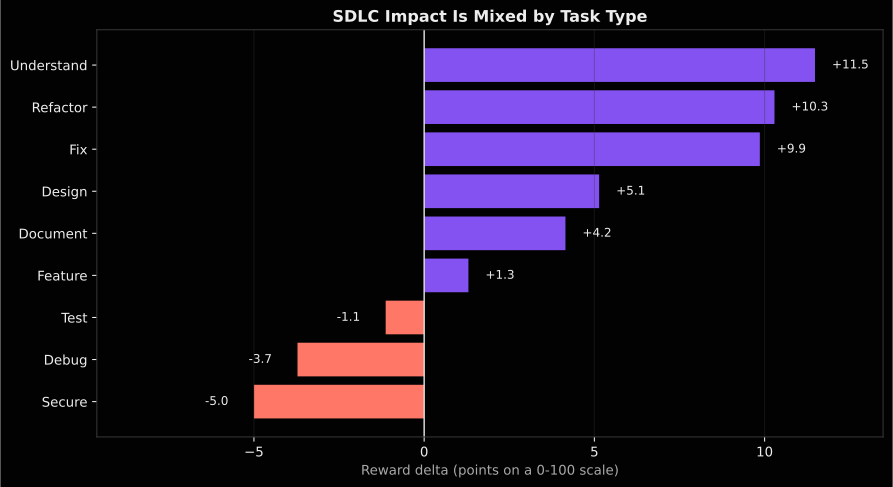
Breaking it down by SDLC element (which is how I designed this side of the benchmark), purple indicates MCP scored higher rewards, and red indicates MCP scored lower rewards. The numbers are the relative percentage difference in reward scores.
Where Sourcegraph MCP wins
From the figure above, you can see that, not too surprisingly, the most substantial SDLC gain is the Understand suite (11.5% gain in reward). The Refactor and Fix suites also show reward improvements (+10.3% and +9.9%). Most significant gains, though, come from cross-repository discovery tasks.
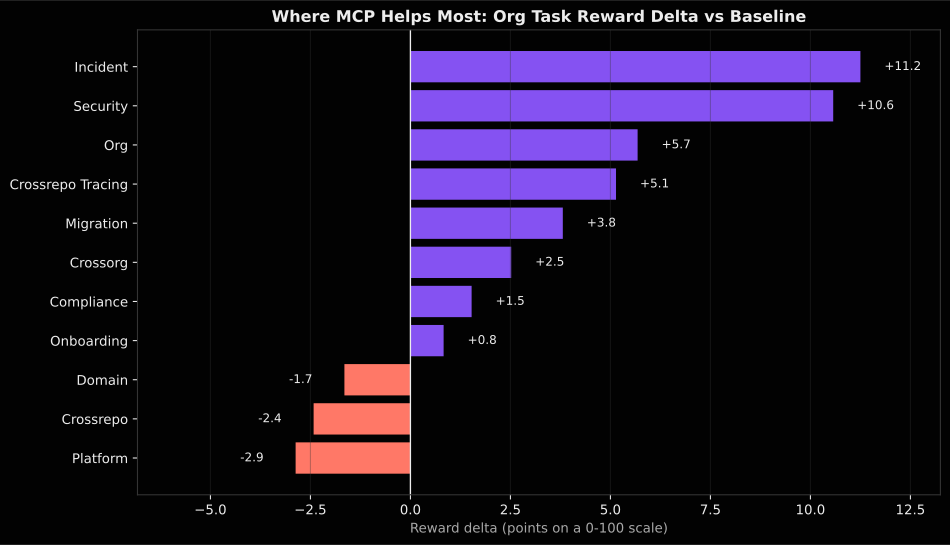
When the agent needs to find information scattered across multiple repos, MCP tools help.
The most significant effects are on incident debugging (11.2% gain) and security (10.6% gain). These represent critical enterprise development work: tracing a vulnerability across a dozen repos, mapping error paths across microservices, etc.
Some benchmark highlights
Understanding impact in a large codebase: The baseline agent hit its nearly 2-hour timeout navigating the Kubernetes monorepo and couldn't complete the task. MCP completed it in 89s with a reward of 0.90/1.0. The MCP agent used 8 keyword searches, 6 semantic searches, and 1 find_references call to map the DRA allocation impact chain across cross-package dependencies. This task was infeasible with only local retrieval tools.
A refactor task: Hard cross-file Java refactoring in the Strata finance library. Both configs took ~17 min. Baseline made minimal changes (6 lines added, 6 removed across 2 files), reward 0.32. MCP identified all affected files for a complete refactoring (725 lines added) that passed all verifier tests; reward: 0.80.
Another hard cross-file refactoring: Baseline made 96 tool calls over 84 min (including 6 backtracks) for a reward of 0.32. MCP made 5 tool calls in 4.4 min, earning a reward of 0.68. The MCP agent searched for RecordAccumulator and related symbols, read 3 files, and completed the task with over double the reward score.
Where Sourcegraph MCP doesn't seem to help
All of the other SDLC and Org task suites with negative deltas were effectively flat (the error bars cross 0, so the effect isn't distinguishable, and the deltas are all smaller than 0.05 anyway). However, there is more to look into there: the task counts may not be sufficient for adequate power; I need to dig further into the traces for more detective work. Codebase size and the MCP preamble are additional factors to look into further.
Improving context retrieval also isn't the bottleneck for every software development situation. Codebase size, harness, language, task type, and prompt content all contribute. The technical report covers the full per-suite breakdown.
Retrieval differences
I built an information retrieval evaluation pipeline alongside task scoring to measure how agents find information across codebases and whether they use it (or don't) to complete their tasks (or not).
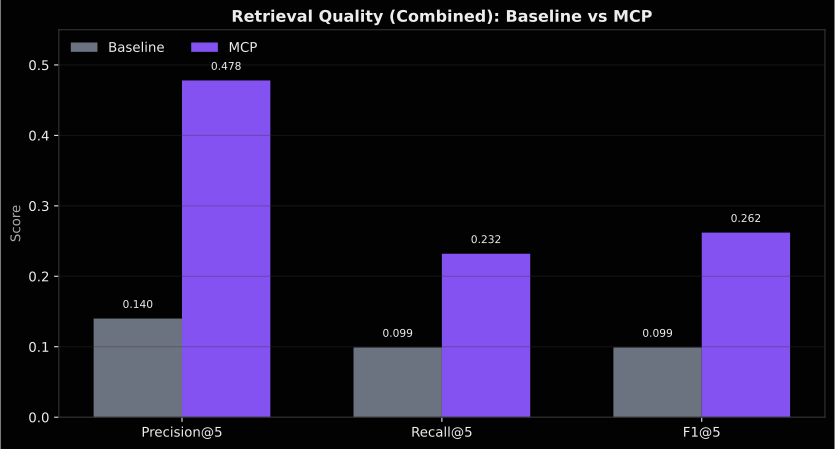
These preliminary results show that MCP retrieval substantially improves the amount and quality of context retrieved compared to the baseline. Across the combined dataset, file recall increases from 0.127 to 0.277, Precision@5 rises from 0.140 to 0.478, and F1@5 improves from 0.099 to 0.262, indicating that MCP retrieves both more relevant files and a larger fraction of the ground truth within the top results.
The largest gap appears in the Org benchmark. Baseline performance is extremely low (e.g., P@5 = 0.007, R@5 = 0.002), while MCP reaches P@5 = 0.471 and R@5 = 0.149. This reflects the structure of the tasks: CSB-Org tasks are primarily cross-repository discovery tasks, where the ground truth often spans multiple repositories, files, and symbol chains.
Sourcegraph MCP tools are optimized for large-scale cross-repo retrieval, returning targeted file paths and symbol hits across repositories quickly and precisely. This directly aligns with the structure of Org tasks, improving both precision and recall. These initial benchmark results highlight the conditions under which retrieval tooling provides the greatest benefit.
Cost and speed
MCP is, on average, cheaper than baseline in this run set. Across matched tasks, the cost per task drops from about $0.73 to $0.51, roughly a 30% reduction in cost.
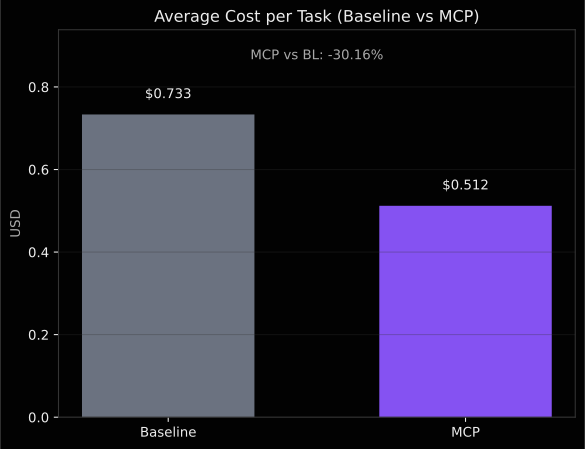
I also found that MCP is faster across the board, cutting wall-clock time by 47 seconds and agent execution time by 90 seconds. These cost and time cuts add up when you have swarms of background agents in large repos.
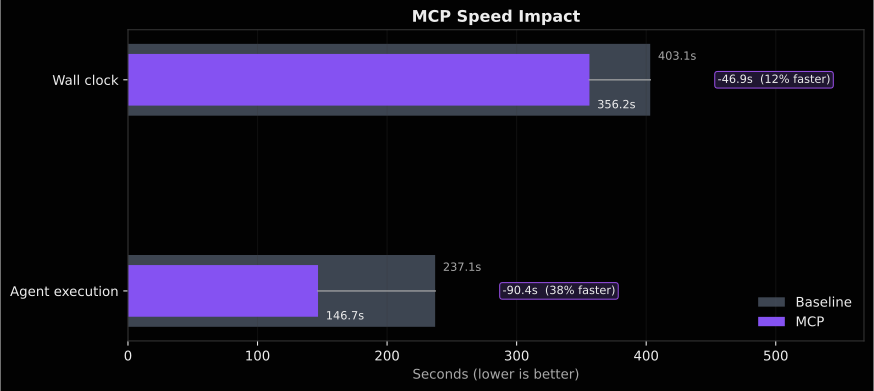
Agent execution time (excluding infrastructure overhead) is the more useful clock metric: the agent's problem-solving phase is 38% shorter with MCP.
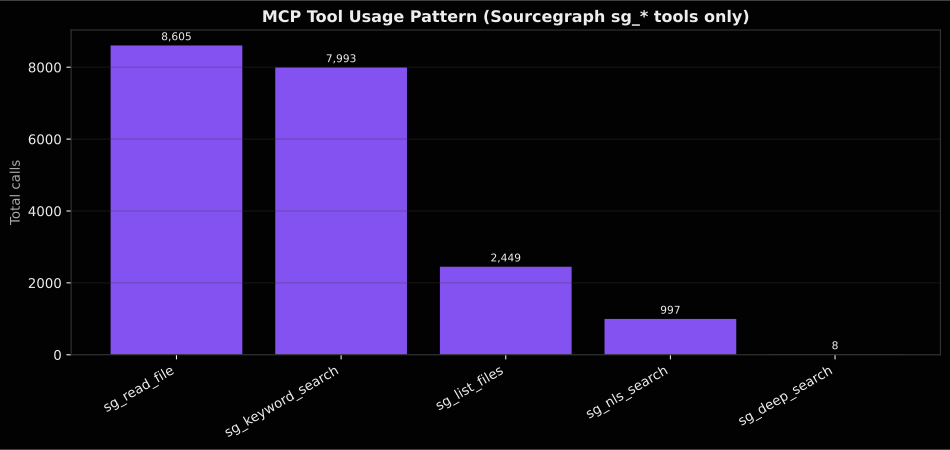
Agents overwhelmingly default to keyword search. Deep Search was rarely invoked organically (6 tasks, 8 calls across 602 MCP runs). The agent relies on keyword search (4,813 calls) and file reading (6,324 calls) as its primary MCP tools. Natural language search is used in ~42% of tasks but accounts for only 587 calls, vs 4,813 for keyword search. The search strategy breakdown: the vast majority of tasks use keyword-only or keyword-dominant approaches, with natural language search as a secondary fallback, and Deep Search is effectively ignored. Agents have a strong preference for exact keyword matching over semantic search, even when they are told outright about these tools.
Auditable results (transcripts!)
I mentioned earlier that benchmark results should ship with full agent transcripts. Here's how I approached it for this benchmark framework.
Every task run in CodeScaleBench produces two artifacts beyond the score: a structured result.json with task metadata, pass/fail status, rewards, and timing, plus a full tool-usage transcript showing how the agent interacted with tools, including MCPs. These transcripts are how I found the git history bypass hack, what Claude Code called MCP death spirals, verifier failures, and every other issue in this post. Without them, those issues could persist, undermining the validity of the results.
All results described here, including full traces, tool breakdowns, and IR metrics, are published in the repo here.
The results explorer
In addition to being able to navigate the results via markdowns, if you clone the repo and run:
python3 scripts/export_official_results.py --serve
You get a local results explorer that lets you browse every task run. It shows task results across all suites, configs, and runs.
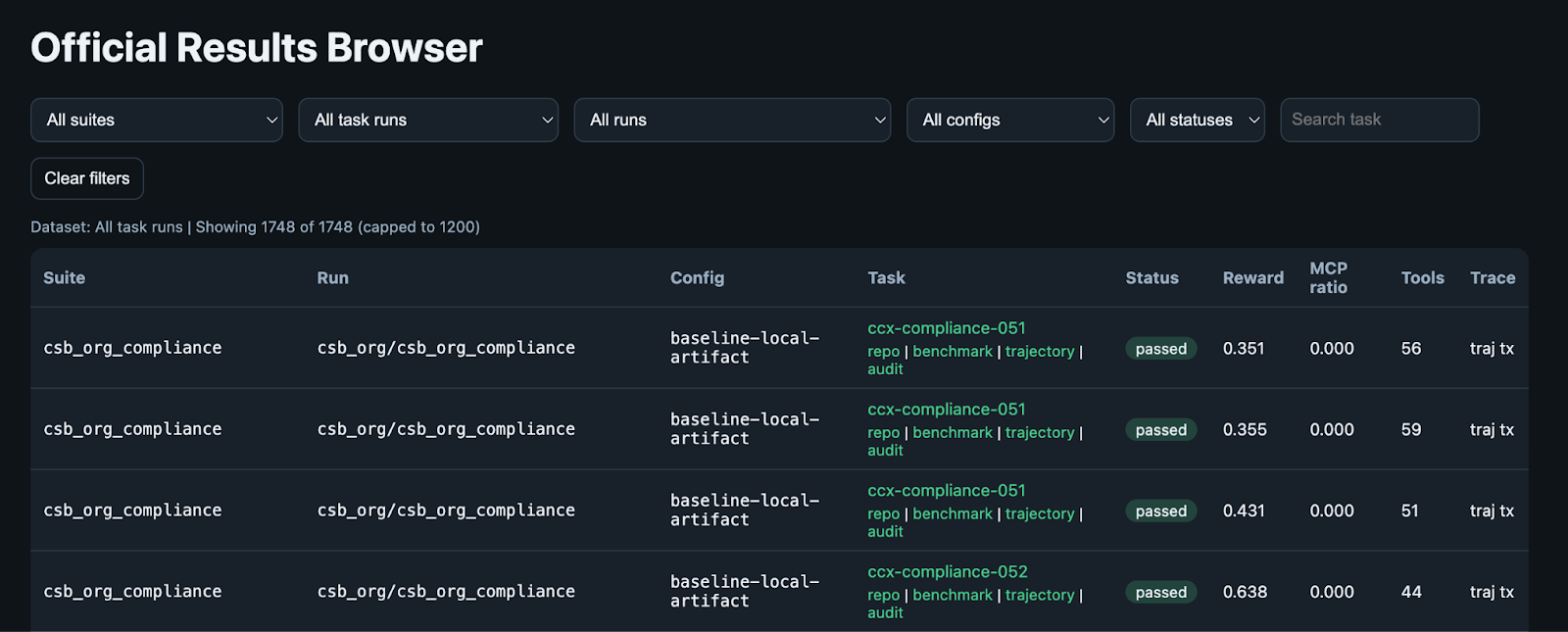
The Official Results Browser lets you filter by suite, task run, config, and status. Every row links to the task's repo, benchmark definition, trajectory, and audit trail.
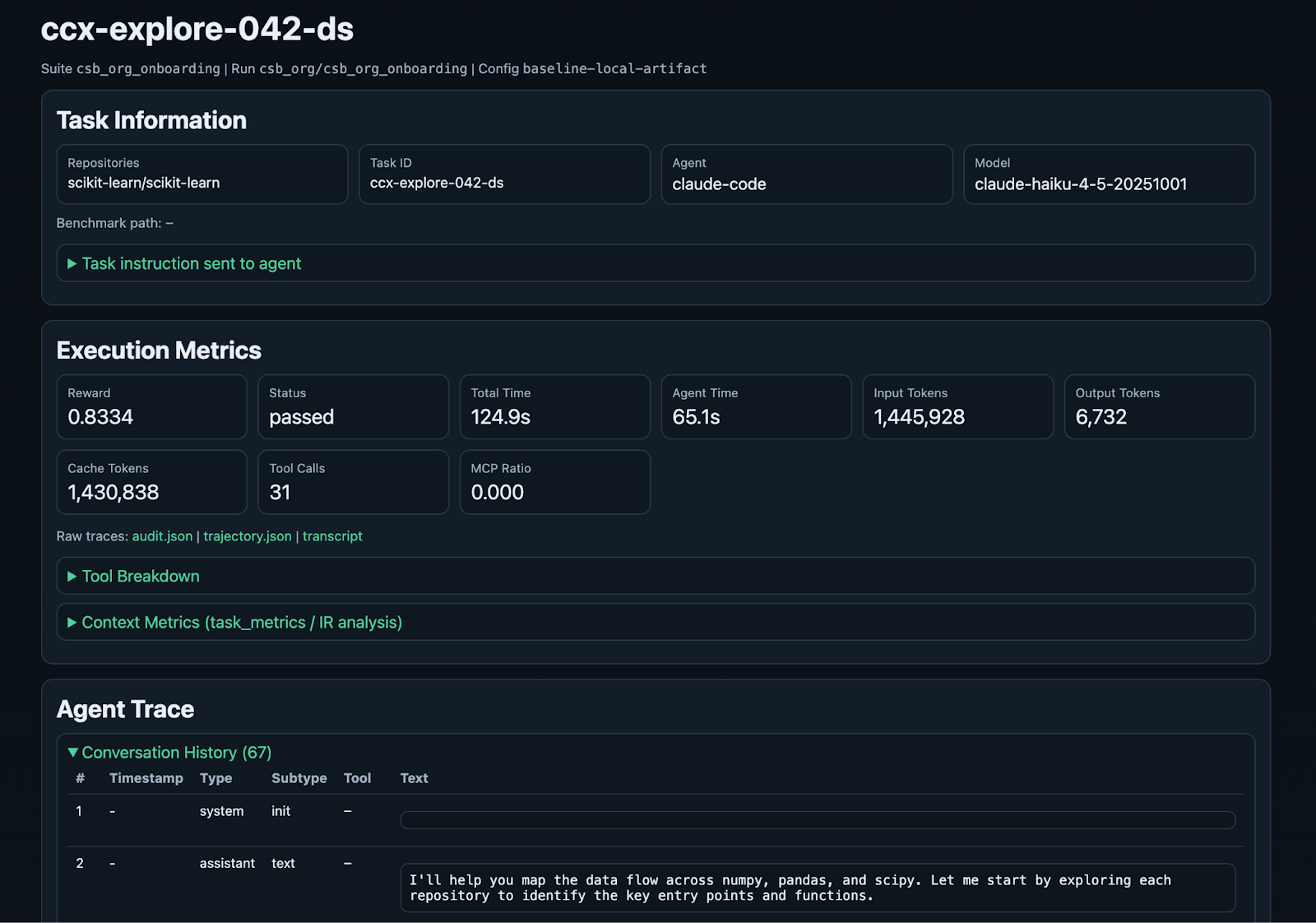
Drilling into a specific task, here's a baseline run of an onboarding task from CSB-Org where the agent needs to map data flow across the Python libraries numpy, pandas, and scipy.
And an example MCP-augmented run in the CSB-SDLC Fix suite. The agent resolves a bug in the massive Kubernetes repo, earning a reward score of 0.74 with ~99s of agent task time.
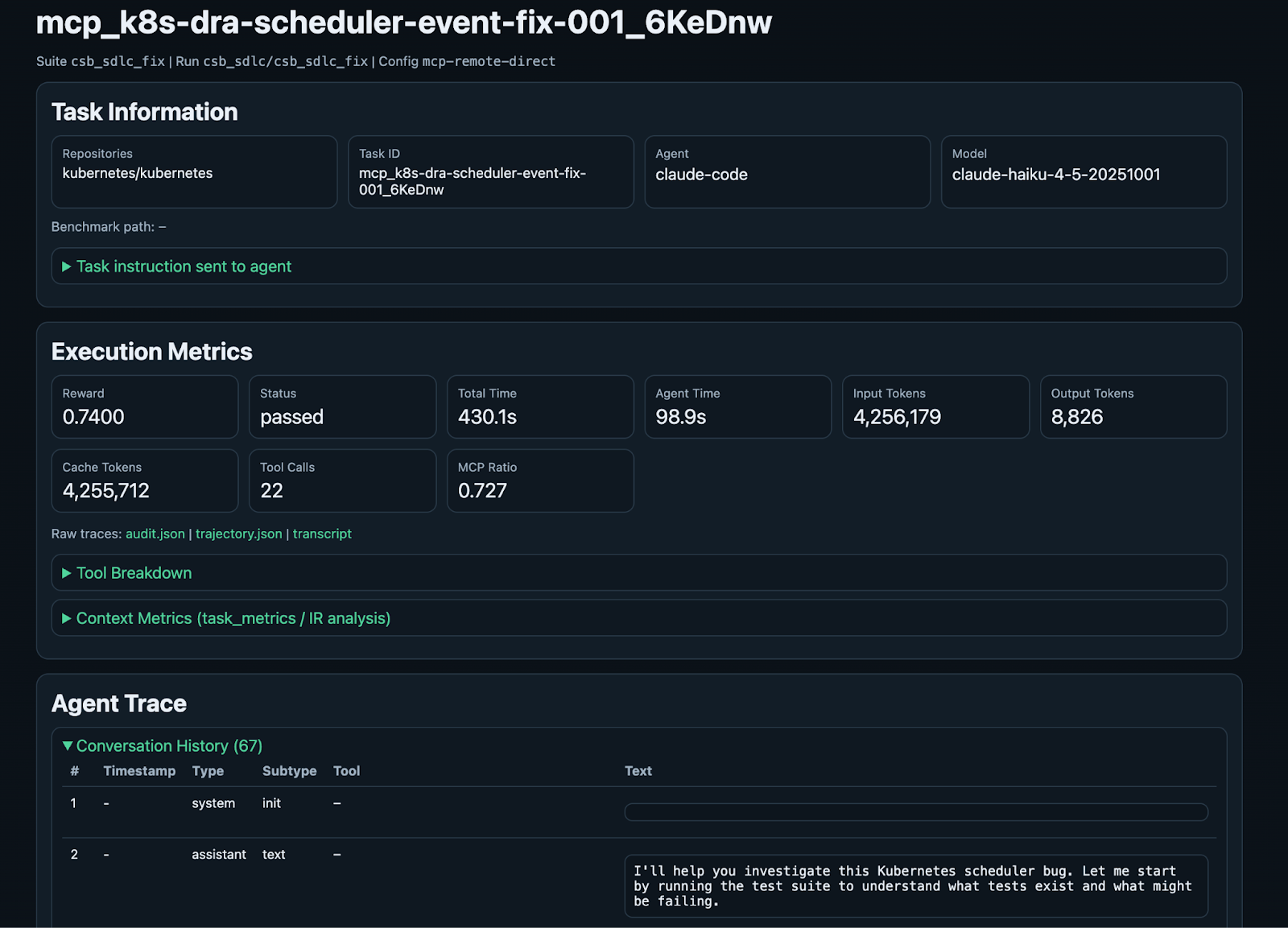
Each task detail view includes expandable sections for the tool breakdown, context metrics/IR analysis, and the complete conversation history. You can verify not only whether the agent succeeded, but also how it approached the task, what tools it used, and where it went right or wrong.
How I built this
I built CodeScaleBench almost entirely with Claude Code, the same coding agent I used for the initial benchmark runs. ~1000 conversation sessions over about a month producing the task selection pipeline, 190+ Docker environment variants, a 3,500-line IR evaluation pipeline, a 7-function oracle scoring system, and helper skills for everything from benchmark design to pre-flight validation to results QA.
For fun, I also asked Claude to analyze our conversations throughout the project and produce some visualizations.
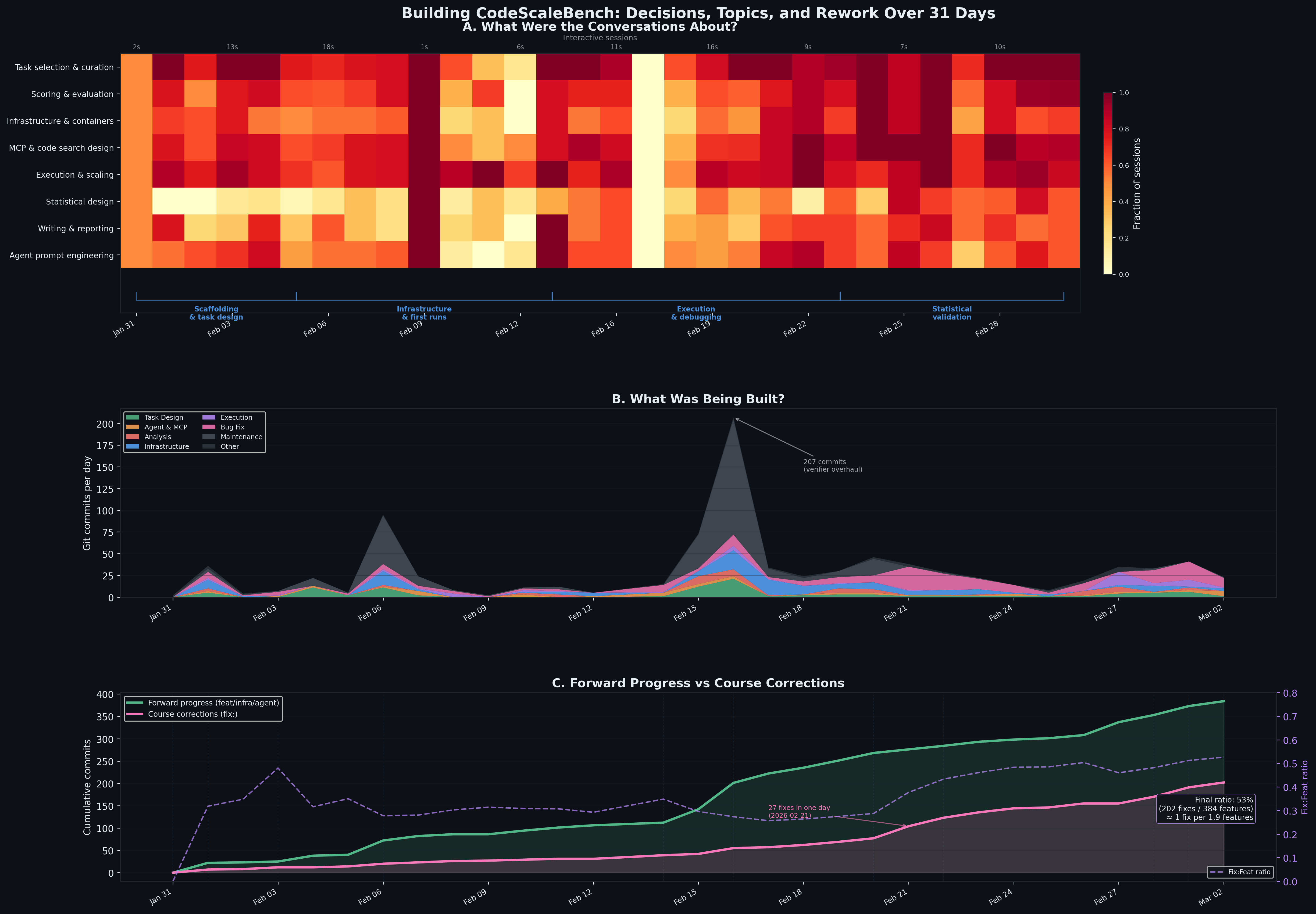
As you can see, lots of scope creep followed by backtracking and fixing, but it's cool to have all of that conversation history to turn into artifacts like this. Claude also visualized session size and commit metrics, tool usage, and the amount of human involvement.
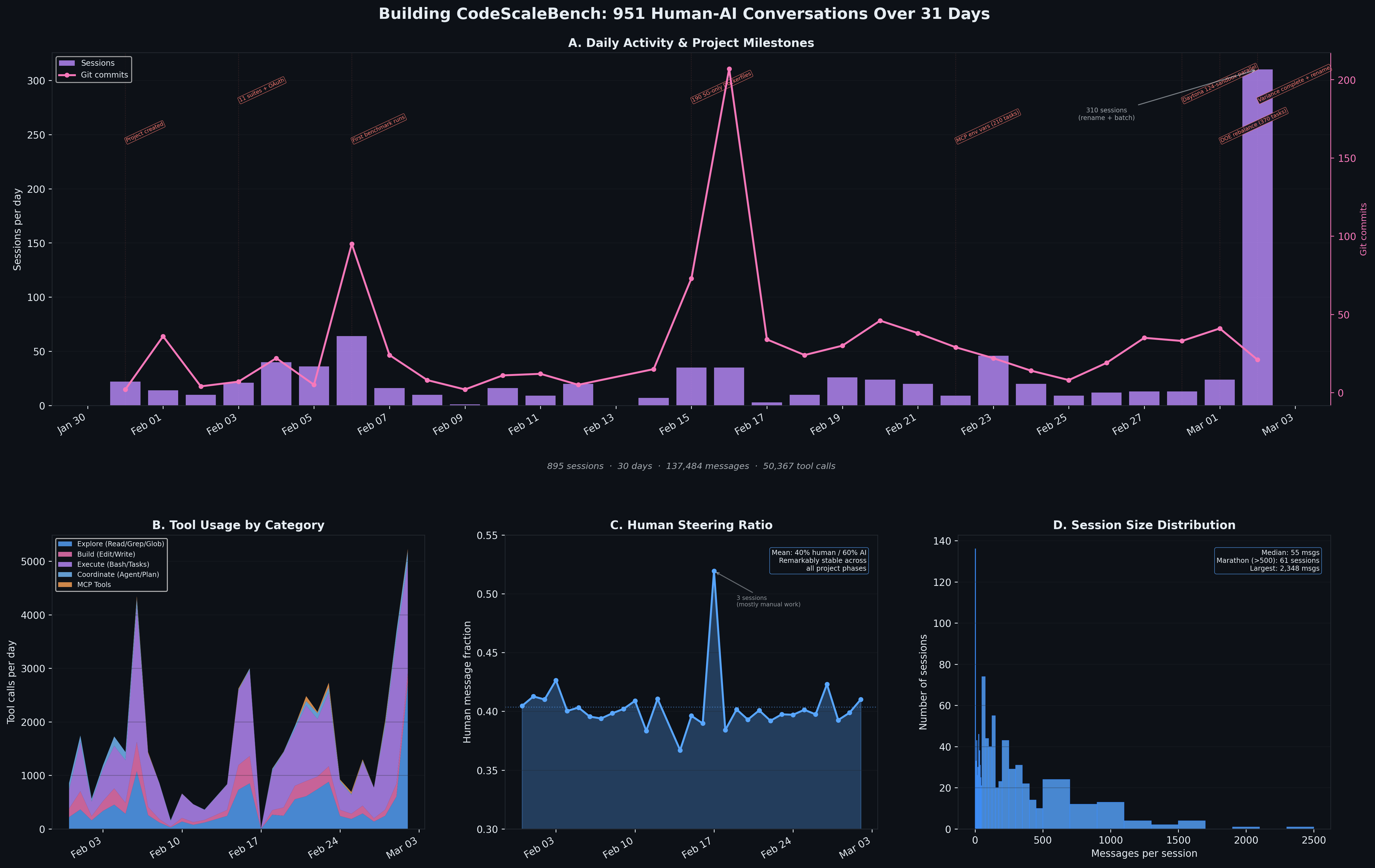
Except for one spike, it was mostly a 60% AI / 40% human collaboration via messages. I did not write a single line of code myself, and I rarely even ran any of the run or audit commands because Claude handled them with custom skills.
Benchmark QA is SUPER IMPORTANT
Speaking of QA, that has taken (and continues to take) the majority of the benchmark creation time. One of my first QA audits found nearly 30 issues across the benchmark infrastructure: broken verifiers, instruction contamination (a bunch of task instructions had Sourcegraph references leaking into the baseline config), silent scoring failures, our PyTorch verification checks were accidentally ineffective because of a name collision that caused make to skip the verifier commands, and on and on—just a bunch of infrastructure whack-a-mole. Benchmark maintainers freeze the versioning, so all harness and model combinations encounter the same issue. Still, they do not always disclose those issues to reviewers and decision-makers who base decisions on benchmark results.
Side note: A while back, when I was doing some tests with Amp and Terminal Bench, I encountered a bug in one of their tasks (I thought it was my own fault for a while, but it was a bug in their task). The issue wasn't reported anywhere in the benchmark or raised on GitHub, and I was basically just told to wait for the next iteration of the benchmark and accept that the task result would be flawed. I feel like if a task is known to be problematic, we should exclude it from the runs and recalculate existing leaderboard scores (we have all the data to do so easily), or at least educate people better about the fragility of these systems if we intend them to in any way inform workflow and agent design modifications.
To mitigate the fragility in my own setup, I had Claude develop some QA and other benchmarking helper skills and built an agentic benchmark checklist pipeline (the one I mentioned earlier, inspired by this paper). Automated validation across six dimensions also processes every run before promoting it to official status. It detects instruction contamination, broken verifiers, reproducibility issues, ghost runs, misclassified errors, and tool effectiveness problems. I send the run outputs directly to staging and promote the runs to 'official' once they pass several quality gates.
The six dimensions:
- Task Validity -- instruction quality, Dockerfile correctness, task metadata
- Outcome Validity -- verifier soundness, scoring accuracy, fail2pass checks
- Reporting --
result.json completeness, metrics extraction, audit trail
- Reproducibility -- deterministic environments, pinned commits, verifier idempotence
- Tool Effectiveness -- MCP adoption rates, zero-tool detection, death spiral flagging
- Statistical Validity -- sufficient sample size, paired comparison integrity, CI coverage
A couple QA-detective highlights:
MCP Preamble: This is the instruction text prepended to each task telling the MCP agent about its tools. I went through five iterations:
V1 and V2 were too subtle, so the agent never used MCP tools. At that time, I was also putting the local code into the Docker container along with the MCP, which further confused it. V3 overcorrected a bunch of all caps reinforcement text, which got 90%+ adoption but caused what Claude Code coined the "MCP death spiral": when a mirror was broken, or a repo name was wrong, the agent would spend its entire context window retrying failed MCP queries, scoring 0.0 on tasks where the baseline scored 1.0. This was primarily due to environmental issues separate from the preamble. For V4, I reverted to "soft guidance," and adoption dropped to 40%. V5 finally produced acceptable results with: "These files are not present locally, you must use MCP tools to access source code," which forced adoption without mandating a specific workflow, though largely driven by me removing local code entirely.
Honestly, I still don't think the preamble is perfect, and I think one of the main takeaways for folks using the Sourcegraph MCP is that you need to experiment with which agent prompt works best in your codebase. The value you get from it can depend strongly on that setup.
Claude gaming the system with git treachery: There are more examples of Claude doing weird stuff that I had to do detective work to find, but one particularly memorable one was a git history bypass bug. I discovered that Claude was being sneaky, gaming the truncation I had set up in the MCP Docker environments. Claude figured out that git show HEAD: filename could recover the complete source from the git history, completely defeating the experimental setup. The fix (recommitting the truncated state as a new commit so git show HEAD: returns empty files) was straightforward enough, but finding it required actually reading through agent transcripts (or rather, asking another Claude to). A reminder that systematic QA during benchmark design, especially with AI-generated infrastructure, is non-negotiable.
It isn't perfect, and I don't 100% trust a run's promotion to 'official' even after these checks pass and I continuously run validation sweeps. I will review it even more carefully before presenting the results in a white paper. Iterative, borderline-paranoid QA is a benchmark requirement if you want to do it right, anyway.
Takeaways
I built CodeScaleBench because I couldn't find a benchmark that measured what actually matters in enterprise software development: large codebases, multi-repo work, and tasks beyond bug fixing. What the data says so far:
MCP helps most on cross-repo, high-complexity work.
The clearest gains are in org-scale tasks like incident debugging and security, where context is fragmented across repos and symbol chains.
Tasks with the MCP are completed faster and cheaper.
MCP runs are consistently faster in both wall time and agent execution time, and are cheaper on average per task. This especially matters when running background agents in bulk.
Retrieval quality improved a lot with the MCP, but retrieval alone isn't everything.
Better recall/precision/F1 doesn't always translate into a huge reward jump. Harness behavior, verifier design, codebase shape, and task type still matter.
Agents mostly do lexical search unless pushed.
Even with better tools available, they default to keyword search and underuse semantic/deep retrieval. Tool capability is one thing; tool adoption is another.
Benchmark QA is extremely time-consuming and extremely important.
Most time went into finding silent failures, verifier bugs, instruction contamination, and agent exploit paths. Without aggressive QA + transcript audits, benchmark numbers are easy to overtrust.
This is directional evidence, not a final verdict.
I still need more runs, more balanced task distributions, and more harnesses. But the current signal is strong: retrieval tooling matters most where enterprise development is hardest.
The technical report includes the full methodology, statistical analysis, and details of the evaluation pipeline.
What's next
Many, but not all, of the tasks have multiple runs, and I have more tasks to run to better account for agent non-determinism. I'm expanding the benchmark framework to support six agent harnesses (Claude Code, Codex, Cursor, Gemini, Copilot, OpenHands). Running the full suite across multiple agents will separate the MCP tool's effectiveness from agent-specific strengths.
I'm also planning Deep Search-focused and other MCP tool-combination-focused experiments, SCIP-indexed codebase comparisons (compiler-accurate code navigation vs. text search), and evaluations of alternative MCP providers, such as the GitHub MCP server. The benchmark is provider-agnostic, and the standardized MCP protocol means you can swap providers with just a config change.
If you're building or evaluating tools for agents working on software development (or just interested in that stuff) and want to check out the benchmark, the repo is public. I'd love to get thoughts and feedback from folks (you can email me at steph@sourcegraph.com). I'll write up another post soon linking to the white paper with the finalized benchmark design, data, and interpretations.